/****** SSMS 中 SelectTopNRows 命令的指令碼 ******/
SELECT [TimeStart],replace([UserName],'WIN2K3SRVSQL\','') UserName,Name,[Parameters]
FROM [ReportServer].[dbo].[ExecutionLogStorage],[ReportServer].[dbo].Catalog
WHERE UserName not like '%Administrator%'
AND ReportID = ItemID
ORDER BY 1 DESC
2015年8月9日 星期日

2015年7月28日 星期二
Reporting Service 連結 Oracle 出現 rsErrorOpeningConnection
裝好Oracle Client後:
1. 設定環境變數ORACLE_HOME
2. 重開IIS Admin Service
1. 設定環境變數ORACLE_HOME
2. 重開IIS Admin Service
2015年4月7日 星期二
Reporting Service Execution History Log
/****** SSMS 中 SelectTopNRows 命令的指令碼 ******/
SELECT [TimeStart],replace([UserName],'WIN2K3SRVSQL\','') UserName,Name,[Parameters]
FROM [ReportServer].[dbo].[ExecutionLogStorage],[ReportServer].[dbo].Catalog
WHERE UserName not like '%Administrator%'
AND ReportID = ItemID
ORDER BY 1 DESC
SELECT [TimeStart],replace([UserName],'WIN2K3SRVSQL\','') UserName,Name,[Parameters]
FROM [ReportServer].[dbo].[ExecutionLogStorage],[ReportServer].[dbo].Catalog
WHERE UserName not like '%Administrator%'
AND ReportID = ItemID
ORDER BY 1 DESC
2013年1月3日 星期四
Reporting Service : Memory Configuration Settings
http://msdn.microsoft.com/en-us/library/ms159206.aspx
Configure Available Memory for Report Server Applications
...
Example of Memory Configuration Settings
The following example shows the configuration settings for a report server computer that uses custom memory configuration values. If you want to add WorkingSetMaximum or WorkingSetMinimum, you must type the elements and values in the RSReportServer.config file. Both values are integers that express kilobytes of RAM you are allocating to the server applications. The following example specifies that total memory allocation for the report server applications cannot exceed 4 gigabytes. If the default value for WorkingSetMinimum (60% of WorkingSetMaximum) is acceptable, you can omit it and specify just WorkingSetMaximum in the RSReportServer.config file. This example includes WorkingSetMinimum to show how it would appear if you wanted to add it:<MemorySafetyMargin>80</MemorySafetyMargin> <MemoryThreshold>90</MemoryThreshold> <WorkingSetMaximum>4000000</WorkingSetMaximum> <WorkingSetMinimum>2400000</WorkingSetMinimum>
About ASP.NET Memory Configuration Settings
Although
the Report Server Web service and Report Manager are ASP.NET
applications, neither application responds to memory configuration
settings that you specify in the processModel
section of machine.config for ASP.NET applications that run in IIS 5.0
compatibility mode. Reporting Services reads memory configuration
settings from the RSReportServer.config file only.
2013年1月2日 星期三
Reporting Service : pass null parameter value
http://server/ReportServer/Pages/ReportViewer.aspx?Report&Parameter:IsNull=True2012年12月24日 星期一
Reporting Service : CIE分佈圖


X1屬性

X1屬性


Y1屬性

CIEY屬性


SQL :
select cie_rank,pri,x1,y1,null ciey,
row_number() over(partition by x1,y1 order by cie_rank) xy_rownm
from (
select distinct
c.cie_rank,1 pri,
c.x1,c.y1
from m1_mch_ft_header b,system.m1_ft_bin_spec c
where b.test_prog = c.prod_name
and b.mpcrdno in (:aufnr)
and x1 is not null
and c.cie_rank not in ('CIE-H','CIE-L','CIE-LEFT','CIE-RIGHT','Iv-H','Iv-L','Vf-H','Vf-L')
and x1 != 0
union all
select distinct
c.cie_rank,2 pri,
c.x2,c.y2
from m1_mch_ft_header b,system.m1_ft_bin_spec c
where b.test_prog = c.prod_name
and b.mpcrdno in (:aufnr)
and x1 is not null
and c.cie_rank not in ('CIE-H','CIE-L','CIE-LEFT','CIE-RIGHT','Iv-H','Iv-L','Vf-H','Vf-L')
and x1 != 0
union all
select distinct
c.cie_rank,3 pri,
c.x3,c.y3
from m1_mch_ft_header b,system.m1_ft_bin_spec c
where b.test_prog = c.prod_name
and b.mpcrdno in (:aufnr)
and x1 is not null
and c.cie_rank not in ('CIE-H','CIE-L','CIE-LEFT','CIE-RIGHT','Iv-H','Iv-L','Vf-H','Vf-L')
and x1 != 0
union all
select distinct
c.cie_rank,4 pri,
c.x4,c.y4
from m1_mch_ft_header b,system.m1_ft_bin_spec c
where b.test_prog = c.prod_name
and b.mpcrdno in (:aufnr)
and x1 is not null
and c.cie_rank not in ('CIE-H','CIE-L','CIE-LEFT','CIE-RIGHT','Iv-H','Iv-L','Vf-H','Vf-L')
and x1 != 0
union all
select distinct
c.cie_rank,5 pri,
c.x1+0.00001,c.y1+0.00001
from m1_mch_ft_header b,system.m1_ft_bin_spec c
where b.test_prog = c.prod_name
and b.mpcrdno in (:aufnr)
and x1 is not null
and c.cie_rank not in ('CIE-H','CIE-L','CIE-LEFT','CIE-RIGHT','Iv-H','Iv-L','Vf-H','Vf-L')
and x1 != 0
)
union all
select c.cie_rank,null pri,ciex x1,null y1,ciey,null xy_rownm
from m1_mch_ft_line a,m1_mch_ft_header b,system.m1_ft_bin_spec c
where a.header = b.header
and b.test_prog = c.prod_name
and a.bin = c.bin_zone_id
and b.mpcrdno in (:aufnr)
and ciex is not null
and ciex != 0
and c.cie_rank not in ('O/S','BIN1','Ir')

2012年12月19日 星期三


2012年6月8日 星期五
2012年2月22日 星期三
Reporting Services 2008: Showing HTML content, and what it really renders
http://dinesql.blogspot.com/2010/05/reporting-services-2008-showing-html.html
So, if you get a value like above and need show them as you want, not just set of HTML tags, get the properties of the placeholder and select the second radio button HTML – Interpret HTML tags as styles.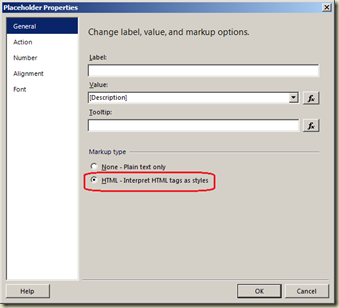 When I tested this, I noticed a kind of issue (for me :)), a discrepancy with BIDS preview and SSRS Report Manager preview. Let me show you. I created below table in tempdb and inserted one record. The values in the record contains set of HTML tags. What I have really added to both Description1 and Description2 is:
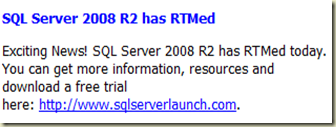
Here is the code.
Embedding HTML within text is possible with Reporting Services. But the problem is, whether Reporting Services supports all HTML tags or not, and that is what I am going show here:
Simply, if you get a value that contains HTML tags, the value can be shown as “HTML”, not as just a value. For example, if a value coming from a column is something like this:
<b><i>Can this be render as HTML?</i></b>
This can be shown as:
Can this be render as HTML?
This does not automatically happen. If you do not instruct to Reporting Services to render the values as HTML, it will be shown as it is.
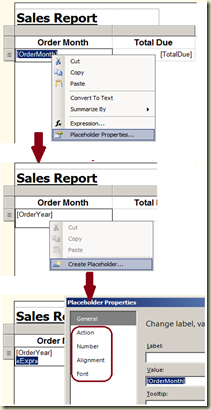 The instruction has to be passed via placeholders. As you know, when you place a field in a cell, it is placed in a placeholder, and all your formatting will be applied to the placeholder. Reporting Services 2008 allows you to add multiple placeholders in a single cell and have different formatting on them, resulting a cell contains values from multiple columns, with different formatting.
 The instruction has to be passed via placeholders. As you know, when you place a field in a cell, it is placed in a placeholder, and all your formatting will be applied to the placeholder. Reporting Services 2008 allows you to add multiple placeholders in a single cell and have different formatting on them, resulting a cell contains values from multiple columns, with different formatting.
 So, if you get a value like above and need show them as you want, not just set of HTML tags, get the properties of the placeholder and select the second radio button HTML – Interpret HTML tags as styles.
 When I tested this, I noticed a kind of issue (for me :)), a discrepancy with BIDS preview and SSRS Report Manager preview. Let me show you. I created below table in tempdb and inserted one record. The values in the record contains set of HTML tags. What I have really added to both Description1 and Description2 is:
Here is the code.
CREATE TABLE TestTable
(
Id int PRIMARY KEY,
Description1 varchar(max) NOT NULL,
Description2 varchar(max) NOT NULL
)
INSERT INTO TestTable(Id, Description1, Description2)
VALUES(1,
'<p><span style=''font-size:8.5pt;font-family:"tahoma";color:blue''>
<b>SQL Server 2008 R2 has RTMed</b></span></p>
<p><font size=8.5 color=black face=tahoma>Exciting News! SQL Server 2008 R2 has RTMed
today. You can get more information, resources and download a free trial
here: <a href="http://www.sqlserverlaunch.com" target="_blank"><font color=blue >http://www.sqlserverlaunch.com</font></a>.
</p>
',
'<p><font size=8.5 color=blue face=tahoma><b>SQL
Server 2008 R2 has RTMed</b></font></p>
<p><font size=8.5 color=black face=tahoma>Exciting News! SQL Server 2008 R2 has RTMed
today. You can get more information, resources and download a free trial
here: <a href="http://www.sqlserverlaunch.com" target="_blank"><font color=blue >http://www.sqlserverlaunch.com</font></a>.
</p>
'
)
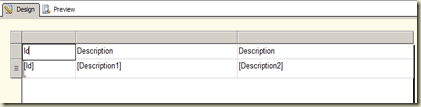
If you clearly go through the code, you will see that, though the output of HTML tags are same, a small different is exist between Description1 HTML tags and Description2 HTML tags, for the title which is “SQL Server 2008 R2 has RTMed”. Then I created a Reporting Services project and created a report with this record. Here is my report with BIDS.

Then I opened the placeholder properties of Description1 and set the Markup type as HTML. I did same for Description2 too. Here is the preview of the report.
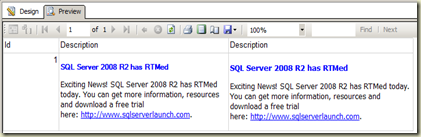

My next step was, publishing the report. This is what I see when the report is published.
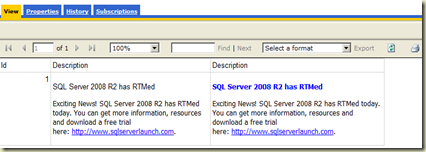

Can you see the difference of preview between designer and report manager? This is because of the HTML tags we have used with Description1. Designer preview shows both columns as we need but Report Manager does not show it properly. I am not sure about the reason, it must be a limitation with HTML renderer in Reporting Services.
HTML Tags supported by Reporting Services 2008
As I mentioned before, Reporting Services 2008 does not support all HTML tags. Here are tags that can be used with Reporting Services 2008.
As I mentioned before, Reporting Services 2008 does not support all HTML tags. Here are tags that can be used with Reporting Services 2008.
<A> <FONT> <H1>, <H2>, <H3>, <H4> <SPAN> <DIV> <P> <BR> <LI> <B> <I> <U> <S> <OL> <UL>
Remember, although it supports tags like <SPAN> and <DIV>, it seems it does not take the attributes we add to them. Note that I have set the same style for Description1 title, just like the one I have applied to Description2. Only difference is, I have used <SPAN> for Description1 and <FONT> for Description2. Once complied and published, it seems the Reporting Services has not taken the added attributes in <SPAN> tag to the complied report.
Now you know the how and what we can apply. Have fun!
2012年1月9日 星期一
2011年12月9日 星期五
Reporting Services报表常用的URL参数
Reporting Services报表常用的URL参数
2009年12月07日 星期一 3:43 P.M.
报表URL参数的结构:
http://ServerName/reportserver?/ReportFolder/ReportName&Parameters
其中: ServerName表示服务器名称,如果端口不是80还需要加上端口号,如ServerName:8080; ReportFolder表示发布后的报表文件夹; ReportName表示报表名称; &后为报表参数。下面是一个完整的报表URL链接:
http://ServerName:8080/reportserver?%2fAdventureWorks+Sample+Reports%2fProduct+Line+Sales&rs:Command=Render
ReportFolder为: AdventureWorks Sample Reports,中间的空格用“+”连接;
Reportserver后需要使用转义字符,“/”的转义字符是%2f;
ReportName是Product Line Sales;
Parameters是rs:Command=Render
在使用报表URL参数前需要注意的问题:
1、 转义字符:常用的转义字符如下:
2、汉字的转化:URL本身不能直接识别汉字,要想传递汉字,需要将汉字转化为utf-8码。一个通用的方法是通过 HttpUtility.UrlEncode方法将需要转化的汉字转化,这可以通过用代码写一个小工具来实现。另一个更直接的方法是,添加一张报表,报表 名称使用需要转化的汉字,发布报表,然后到reportserver中查看报表,这时报表的链接即包含所需的utf-8码。
3、 报表参数是大小写敏感的,所以必须与原参数的大小写一样,否则会导致参数传递失败。
4、 传递空值参数:格式:ParameterName:isnull=true,如:SalesOrderNumber:isnull=true
举例:
按传递的参数类型,有来自关系型数据库的参数,此类较为简单,按照上文对特殊字符转义并将汉字转换即可。如:
http://ServerName:8080/reportserver?%2fAdventureWorks+Sample+Reports%2fProduct+Line+Sales&rs:Command=Render&StartDate=2003-1-2
其中StartDate为报表参数,其值为”2003-1-2”。
注意:报表参数在报表里面由名称和提示组成,显示出来的名称实际上是提示,比如上面的报表参数名称为“StarDate”而提示为“Start Date”,传递过程中需要使用实际的名称才能保证正确传递。
报表参数来自Cube时,情形稍有变化,如:
& RegionRegion=[Office].[Region].%26[1]
参数名称是“RegionRegion”,而参数值是“[Office].[Region].&[1]”,参数值使用的是mdx表达式,而不是显示的值,这是与关系型数据库不同的地方。而且此处使用了转义字符,“&”转义为“%26”。
常用的URL参数:
1) &rc:Parameters=Collapsed
Collapsed表示参数栏折叠,通常用于参数较多的情况,效果见图1: Parameters还有另外两个值:true和false,其中true表示显示参数栏,是报表的默认值,false表示隐藏参数栏。隐藏后的效果是图1中去掉红色圆圈的部分。
2) &rc:Toolbar=false
用于控制Toolbar显示或者隐藏,默认为显示,值为false时表示Toolbar隐藏。
3) &rc:Zoom=75
设置报表缩放值,缩放值以整数百分比或字符串常量表示。标准字符串值包括 Page Width 和 Whole Page。其中Page Width表示报表按页宽展示,即报表展示部分占满一整页的宽度。Whole Page表示按页长度展示,即报表展示部分刚好显示在一页。
4) &rs:Format = PDF
指定报表呈现的形式,包括:HTML3.2、HTML4.0、MHTML、IMAGE、EXCEL、WORD、CSV、PDF、XML 和 NULL。
5) &rc:DocMap = false
隐藏或显示文档结构图
http://ServerName/reportserver?/ReportFolder/ReportName&Parameters
其中: ServerName表示服务器名称,如果端口不是80还需要加上端口号,如ServerName:8080; ReportFolder表示发布后的报表文件夹; ReportName表示报表名称; &后为报表参数。下面是一个完整的报表URL链接:
http://ServerName:8080/reportserver?%2fAdventureWorks+Sample+Reports%2fProduct+Line+Sales&rs:Command=Render
ReportFolder为: AdventureWorks Sample Reports,中间的空格用“+”连接;
Reportserver后需要使用转义字符,“/”的转义字符是%2f;
ReportName是Product Line Sales;
Parameters是rs:Command=Render
在使用报表URL参数前需要注意的问题:
1、 转义字符:常用的转义字符如下:
| 序号 | 字符 | 含义 | 十六进制值 |
| 1 | + | URL 中+号表示空格 | %2B |
| 2 | 空格 | URL中的空格可以用+号或者编码 | %20 |
| 3 | / | 分隔目录和子目录 | %2F |
| 4 | ? | 分隔实际的 URL 和参数 | %3F |
| 5 | % | 指定特殊字符 | %25 |
| 6 | # | 表示书签 | %23 |
| 7 | & | URL 中指定的参数间的分隔符 | %26 |
| 8 | = | URL 中指定参数的值 | %3D |
3、 报表参数是大小写敏感的,所以必须与原参数的大小写一样,否则会导致参数传递失败。
4、 传递空值参数:格式:ParameterName:isnull=true,如:SalesOrderNumber:isnull=true
举例:
按传递的参数类型,有来自关系型数据库的参数,此类较为简单,按照上文对特殊字符转义并将汉字转换即可。如:
http://ServerName:8080/reportserver?%2fAdventureWorks+Sample+Reports%2fProduct+Line+Sales&rs:Command=Render&StartDate=2003-1-2
其中StartDate为报表参数,其值为”2003-1-2”。
注意:报表参数在报表里面由名称和提示组成,显示出来的名称实际上是提示,比如上面的报表参数名称为“StarDate”而提示为“Start Date”,传递过程中需要使用实际的名称才能保证正确传递。
报表参数来自Cube时,情形稍有变化,如:
& RegionRegion=[Office].[Region].%26[1]
参数名称是“RegionRegion”,而参数值是“[Office].[Region].&[1]”,参数值使用的是mdx表达式,而不是显示的值,这是与关系型数据库不同的地方。而且此处使用了转义字符,“&”转义为“%26”。
常用的URL参数:
1) &rc:Parameters=Collapsed
Collapsed表示参数栏折叠,通常用于参数较多的情况,效果见图1:
2) &rc:Toolbar=false
用于控制Toolbar显示或者隐藏,默认为显示,值为false时表示Toolbar隐藏。
3) &rc:Zoom=75
设置报表缩放值,缩放值以整数百分比或字符串常量表示。标准字符串值包括 Page Width 和 Whole Page。其中Page Width表示报表按页宽展示,即报表展示部分占满一整页的宽度。Whole Page表示按页长度展示,即报表展示部分刚好显示在一页。
4) &rs:Format = PDF
指定报表呈现的形式,包括:HTML3.2、HTML4.0、MHTML、IMAGE、EXCEL、WORD、CSV、PDF、XML 和 NULL。
5) &rc:DocMap = false
隐藏或显示文档结构图
2011年11月21日 星期一
Reporting Service : 鎖定普通表的header / column
以下針對 Tablix資料表,非Tablix矩陣
1.在資料行群組右邊,有一個下拉三角形,下拉會出現 "進階模式"
2.點擊 "進階模式" 後,下方會出現 "靜態"
3.選 "靜態" 後,有一屬性為 "FixedData";改為True,以後捲動時就會fix住
4.有一屬性為 "RepeatOnNewPage";改為True,第2頁以後也能夠出現資料
5.記得在Tablix屬性中,"捲動時標頭保持可見" 不可打勾,否則無法建置&佈署
2011年11月8日 星期二
ORA-02041 : client database did not begin a transaction
現象:使用DB Link後,Reporting Service發生錯誤
解決方式:
程序内的连接字符串为连接9i时的字符串:Data Source=server;Persist Security Info=True;User ID=user;Unicode=True,而客户所使用的数据库为8,因此就会出现错误信息了,只能怪自己没有仔细注意这些东西,浪费了这么长的时间。
修改后的连接串为:Data Source=server;Persist Security Info=True;User ID=user;Unicode=True;Omit Oracle Connection Name=True
解決方式:
程序内的连接字符串为连接9i时的字符串:Data Source=server;Persist Security Info=True;User ID=user;Unicode=True,而客户所使用的数据库为8,因此就会出现错误信息了,只能怪自己没有仔细注意这些东西,浪费了这么长的时间。
修改后的连接串为:Data Source=server;Persist Security Info=True;User ID=user;Unicode=True;Omit Oracle Connection Name=True
2011年11月3日 星期四
Reporting Service : 一個參數傳多值
1. 上一頁的參數xxx設為 "允許多個值"
2. 下一頁的參數xxx設為 "允許多個值"
3. 上一頁的 "動作"在傳參數時,將 [@xxx] (參數)傳入,而非[xxx] (欄位)
4. 下一頁的SQL 設為 in (:xxx)
5. 上一頁的參數xxx,要參考一個dataset,且預設值和可用值都要參考,且參數設為隱藏。這樣才漂亮
6. 要顯示參數,則用join(Parameter!xxx.Value,",")
2. 下一頁的參數xxx設為 "允許多個值"
3. 上一頁的 "動作"在傳參數時,將 [@xxx] (參數)傳入,而非[xxx] (欄位)
4. 下一頁的SQL 設為 in (:xxx)
5. 上一頁的參數xxx,要參考一個dataset,且預設值和可用值都要參考,且參數設為隱藏。這樣才漂亮
6. 要顯示參數,則用join(Parameter!xxx.Value,",")
Reporting Service : Merge Duplicate
1. hideduplicate : 選上一層group
2. BorderStyle : 在Left ,Right,Top,Bottom作IIf判斷
==> 畫面看起來會是第一筆資料出現後,後面重複的就不見了

2. BorderStyle : 在Left ,Right,Top,Bottom作IIf判斷
==> 畫面看起來會是第一筆資料出現後,後面重複的就不見了
2011年10月23日 星期日


TIPS-如何修改Reporting Service的報表匯出選項
http://darkthread.blogspot.com/2006/12/tips-reporting-service.html
Reporting Service的每一張報表都可以匯出成HTML、PDF、Excel等多種格式,是很好用的功能。但在某些狀況下,你可能希望限制使用者只能匯出其中的幾種格式。

有兩種做法,如果你希望在停用整個Reporting Service對某種匯出格式的支援,可以修改RSReportServer.config,調整Render Node下的Extension。

如 果只想針對某幾張報表隱藏某幾個選項,則可以修改Reporting Services\ReportServer\styles\htmlviewer.css後另存一個新的limitedExport.css,就可以在 CSS中動手腳。連線時則要加上rc:stylesheetcommand=limitedExport,就可以讓CSS中的設定或Javascript 發威。只是這種做法會在沒有指定StyleSheet時失效,這點要留意!
Reporting Service的每一張報表都可以匯出成HTML、PDF、Excel等多種格式,是很好用的功能。但在某些狀況下,你可能希望限制使用者只能匯出其中的幾種格式。
有兩種做法,如果你希望在停用整個Reporting Service對某種匯出格式的支援,可以修改RSReportServer.config,調整Render Node下的Extension。
如 果只想針對某幾張報表隱藏某幾個選項,則可以修改Reporting Services\ReportServer\styles\htmlviewer.css後另存一個新的limitedExport.css,就可以在 CSS中動手腳。連線時則要加上rc:stylesheetcommand=limitedExport,就可以讓CSS中的設定或Javascript 發威。只是這種做法會在沒有指定StyleSheet時失效,這點要留意!


2011年10月12日 星期三
Reporting Service Log Files 路徑
C:\Program Files\Microsoft SQL Server\MSRS10.MSSQLSERVER\Reporting Services\LogFiles
2011年9月15日 星期四
Reporting Service : Tablix 在增加X軸欄位後,有時最右邊欄位部份空間會被截掉
解決方式:
1. 修改主體屬性Size
2. 修改報表屬性PageSize
原則上,只要2的PageSize.Width < 1的Size.Width;而且足夠長,則上述問題就會解決
1. 修改主體屬性Size
2. 修改報表屬性PageSize
原則上,只要2的PageSize.Width < 1的Size.Width;而且足夠長,則上述問題就會解決
訂閱:
文章 (Atom)