FI:
OB28 validation
OBBH substitution
CMOD user exit
SE95 enhancement
2014年3月19日 星期三

2014年3月13日 星期四
tax codes configuration
http://scn.sap.com/thread/1162746
tax codes configuration
1.Define Tax Procedure -- OBQ3
2.Assign country to Calculation Procedure --OBBG
3.Creation of tax codes---FTXP
4.Assign 0% tax codes for non-taxable transactions---OBCL
5.Assignment of Accounts----OB40
Here you will double click MWS and give Chart of Accounts and give tax code and sale tax account and VST , give tax code and purchase tax account.
6.Assign Tax Codes in Sales Account(G/L Account)----FS00
Tax Rate 稅率
Type Of Tax 稅類型
Tax Separate or Tax Included 外加稅或內含稅
IMG path : 財務會計(新) ->財務會計通用設定(新)->進項/銷項稅->計算->定義營業稅代碼
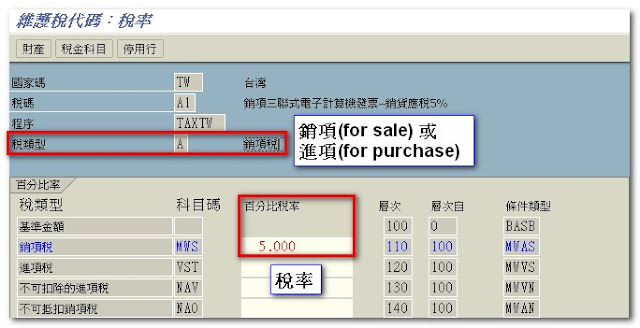
tax codes configuration
1.Define Tax Procedure -- OBQ3
2.Assign country to Calculation Procedure --OBBG
3.Creation of tax codes---FTXP
4.Assign 0% tax codes for non-taxable transactions---OBCL
5.Assignment of Accounts----OB40
Here you will double click MWS and give Chart of Accounts and give tax code and sale tax account and VST , give tax code and purchase tax account.
6.Assign Tax Codes in Sales Account(G/L Account)----FS00
Tax Rate 稅率
Type Of Tax 稅類型
Tax Separate or Tax Included 外加稅或內含稅
IMG path : 財務會計(新) ->財務會計通用設定(新)->進項/銷項稅->計算->定義營業稅代碼

2014年2月4日 星期二
計算付款日期RFC
FI_TERMS_OF_PAYMENT_PROPOSE
計算邏輯:
1)如果有 I_ZFBDT,就以I_ZFBDT為準計算
2)如果沒有I_ZFBDT,就以I_BUDAT為準計算
Import parameters Value
I_BLDAT 2014/01/24 --document date
I_BUDAT 2013/10/01 --posting date
I_CPUDT 2014/02/05 -- entry date
I_ZFBDT 2014/01/24 --起算日
I_ZTERM M030
I_REINDAT
I_LIFNR
I_BUKRS
Export parameters Value
E_ZBD1T 32 --base line date起算第一次付款日(底下數字為35,但應為32)
E_ZBD1P 0.000
E_ZBD2T 0
E_ZBD2P 0.000
E_ZBD3T 0
E_ZFBDT 2014/02/01 --base line date
E_SPLIT
E_ZSCHF
E_ZLSCH
E_T052 600M03000D01010000.000 0000.000 000050100000000

2013年10月16日 星期三
SAP FI Validation : OB28 menu path
http://ierp.us/sap-spro/sap_configuration_spro_img.php?id=4594
01. SAP Customizing Implementation Guide
02.-- Financial Accounting
03.---- Financial Accounting Global Settings
04.------ Document
05.-------- Document Header
06.---------- Validation in Accounting Documents - S_ALR_87003696
01. SAP Customizing Implementation Guide
02.-- Financial Accounting
03.---- Financial Accounting Global Settings
04.------ Document
05.-------- Document Header
06.---------- Validation in Accounting Documents - S_ALR_87003696
2013年10月6日 星期日


2013年9月30日 星期一
F-02 的替代BAPI
1) BAPI_ACC_DOCUMENT_POST
2) BAPI_ACC_GL_POSTING_POST:
不過這只能使用posting key 40/50
40 : positive number
50 : negative number
http://scn.sap.com/message/1512737#1512737
data:
obj_type like bapiache02-obj_type,
obj_key like bapiache02-obj_key,
obj_sys like bapiache02-obj_sys,
documentheader like bapiache08,
accountgl like bapiacgl08
occurs 0 with header line,
currencyamount like bapiaccr08
occurs 0 with header line,
return like bapiret2
occurs 0 with header line,
extension1 like bapiextc
occurs 0 with header line,
t_edidd like edidd occurs 0 with header line,
bapi_retn_info like bapiret2 occurs 0 with header line.
data: error_flag.
*documentheader-obj_type = 'BKPFF'.
*documentheader-obj_key = '18000000002002004'.
*documentheader-obj_type = 'BKPFF'.
*documentheader-obj_key = '180000000010002004'.
*documentheader-obj_sys = 'RD1CLNT200'.
documentheader-username = sy-uname.
documentheader-header_txt = 'Test using BAPI'.
documentheader-comp_code = '1000'.
*documentheader-ac_doc_no
*documentheader-fisc_year = '2005'.
documentheader-doc_date = sy-datum.
documentheader-pstng_date = sy-datum.
*documentheader-trans_date
*documentheader-fis_period
documentheader-doc_type = 'SA'.
*documentheader-ref_doc_no
*documentheader-compo_acc
*documentheader-reason_rev
accountgl-itemno_acc = '1'.
accountgl-gl_account = '0000160100'.
accountgl-comp_code = '1000'.
accountgl-pstng_date = sy-datum.
accountgl-doc_type = 'SA'.
accountgl-profit_ctr = '0000010000'.
append accountgl.
accountgl-itemno_acc = '2'.
accountgl-gl_account = '0000160100'.
accountgl-comp_code = '1000'.
accountgl-pstng_date = sy-datum.
accountgl-doc_type = 'SA'.
accountgl-profit_ctr = '0000010000'.
append accountgl.
*AC_DOC_NO
*FISC_YEAR
*FIS_PERIOD
*accountgl-STAT_CON = 'X'.
*REF_KEY_1
*REF_KEY_2
*REF_KEY_3
*CUSTOMER
*VENDOR_NO
*ALLOC_NMBR
*ITEM_TEXT
*BUS_AREA
*COSTCENTER
*ACTTYPE
*ORDERID
*ORIG_GROUP
*COST_OBJ
*PROFIT_CTR
*PART_PRCTR
*WBS_ELEMENT
*NETWORK
*ROUTING_NO
*ORDER_ITNO
currencyamount-itemno_acc = '1'.
currencyamount-currency = 'GBP'.
currencyamount-amt_doccur = '100.00'.
append currencyamount.
currencyamount-itemno_acc = '2'.
currencyamount-currency = 'GBP'.
currencyamount-amt_doccur = '-100.00'.
append currencyamount.
exporting
documentheader = documentheader
accountgl = accountgl
currencyamount = currencyamount
return = return
extension1 = extension1
exceptions
others = 1.
if sy-subrc <> 0.
message e999(re) with 'Problem occured'.
else.
loop at return.
if not return is initial.
clear bapi_retn_info.
move-corresponding return to bapi_retn_info.
if return-type = 'A' or return-type = 'E'.
error_flag = 'X'.
endif.
append bapi_retn_info.
endif.
endloop.
if error_flag = 'X'.
message e999(re) with 'Problem occured'.
rollback work.
else.
commit work.
endif.
endif.
最後別忘了加上bapi_transaction_commit
2) BAPI_ACC_GL_POSTING_POST:
不過這只能使用posting key 40/50
40 : positive number
50 : negative number
http://scn.sap.com/message/1512737#1512737
data:
obj_type like bapiache02-obj_type,
obj_key like bapiache02-obj_key,
obj_sys like bapiache02-obj_sys,
documentheader like bapiache08,
occurs 0 with header line,
currencyamount like bapiaccr08
occurs 0 with header line,
return like bapiret2
occurs 0 with header line,
extension1 like bapiextc
occurs 0 with header line,
bapi_retn_info like bapiret2 occurs 0 with header line.
data: error_flag.
*documentheader-obj_key = '18000000002002004'.
*documentheader-obj_type = 'BKPFF'.
*documentheader-obj_key = '180000000010002004'.
documentheader-header_txt = 'Test using BAPI'.
documentheader-comp_code = '1000'.
*documentheader-fisc_year = '2005'.
documentheader-pstng_date = sy-datum.
*documentheader-fis_period
*documentheader-compo_acc
*documentheader-reason_rev
accountgl-gl_account = '0000160100'.
accountgl-comp_code = '1000'.
accountgl-pstng_date = sy-datum.
accountgl-doc_type = 'SA'.
accountgl-profit_ctr = '0000010000'.
append accountgl.
accountgl-gl_account = '0000160100'.
accountgl-comp_code = '1000'.
accountgl-pstng_date = sy-datum.
accountgl-doc_type = 'SA'.
accountgl-profit_ctr = '0000010000'.
append accountgl.
*FISC_YEAR
*FIS_PERIOD
*accountgl-STAT_CON = 'X'.
*REF_KEY_1
*REF_KEY_2
*REF_KEY_3
*CUSTOMER
*VENDOR_NO
*ALLOC_NMBR
*ITEM_TEXT
*BUS_AREA
*COSTCENTER
*ACTTYPE
*ORDERID
*ORIG_GROUP
*COST_OBJ
*PROFIT_CTR
*PART_PRCTR
*WBS_ELEMENT
*NETWORK
*ROUTING_NO
*ORDER_ITNO
currencyamount-currency = 'GBP'.
currencyamount-amt_doccur = '100.00'.
append currencyamount.
currencyamount-currency = 'GBP'.
currencyamount-amt_doccur = '-100.00'.
append currencyamount.
- call BAPI-function in this system
exporting
documentheader = documentheader
- importing
- obj_type = obj_type
- obj_key = obj_key
- obj_sys = obj_sys
accountgl = accountgl
currencyamount = currencyamount
return = return
extension1 = extension1
exceptions
others = 1.
if sy-subrc <> 0.
message e999(re) with 'Problem occured'.
else.
loop at return.
if not return is initial.
clear bapi_retn_info.
move-corresponding return to bapi_retn_info.
if return-type = 'A' or return-type = 'E'.
error_flag = 'X'.
endif.
append bapi_retn_info.
endif.
endloop.
if error_flag = 'X'.
message e999(re) with 'Problem occured'.
rollback work.
else.
commit work.
endif.
endif.
最後別忘了加上bapi_transaction_commit
2013年9月24日 星期二
Message no.AA347 You cannot post to asset in compa. code x fiscal year
執行ABAVN時遇到上述問題(DEV環境太舊)
Solution : 使用 T-Code : AJRW,拿掉TEST RUN,並在background執行
參考 http://scn.sap.com/thread/1460300
SAP : Fixed Asset Retirement (報廢) T-Code and BAPI
T-Code : ABAVN
BAPI : BAPI_ASSET_RETIREMENT_CHECK
BAPI_ASSET_RETIREMENT_POST

BAPI : BAPI_ASSET_RETIREMENT_CHECK
BAPI_ASSET_RETIREMENT_POST
2013年6月10日 星期一
MIRO 和 F-90 差別
https://scn.sap.com/thread/1105616
When there is a PO you need to use MIRO and not F-90
The posting from the G/R from the PO is.
GR
70 Asset 100
50 Gr/IR account 100
Invoice MIRO
50 Gr/IR account 100
31 Vendor 100
When there is prices differences it will be posted normal on the asset
What
you then want to do with F-90? When there is a PO the invoice should
always be posted with MIRO assigned to the PO! Other wise you have
problems with your GR/IR account and the PO still expect an invoice!
70 Asset 100
50 Gr/IR account 100
31 Vendor 100
2013年6月7日 星期五
SAP中采购订单形成的几种差异解释
http://www.wysap.com/xuexi/material/20130512/1684.html
SAP中采购订单形成的几种差异解释
时间:2013-05-12 22:06TAG标签: sap采购差异 作者:SAP中文学习网 点击:
次
从采购订单到收货,收发票,会有两个环节,会影响到物料。 1、收货:
(1)如果物料是采用标准价S,那么采购所形成的差异不会立刻就摊到物料上,而是直接进差异科目。只生成一张会计凭证,借:库存 借(贷):差异
贷:应付暂估。 (2)如果物料采用移动平均价V,如果
从采购订单到收货,收发票,会有两个环节,会影响到物料。
1、收货:
(1)如果物料是采用标准价S,那么采购所形成的差异不会立刻就摊到物料上,而是直接进差异科目。只生成一张会计凭证,借:库存 借(贷):差异 贷:应付暂估。
(2)如果物料采用移动平均价V,如果与物料价格有差异,则要视库存是否足够而定(库存数量比那个采购数量多还是少)。
如果库存足够,那么就会立刻生成两张凭证,一张与刚才相同,但是同时生成另一张凭证,将差异摊到库存价值上,从而改变物料的价格。
如果没有库存,就也是只生成一张凭证,差异进差异科目。
如果有部分库存,那么就会按比例,差异一部分进库存,一部分进差异科目。
2、发票校验:如果收到的发票金额与原来的金额不等,那么,所形成的差异进差异科目。差异的处理,与上面是类似的。
3、补充一下,只有采购和生产才会影响到物料的成本,销售不会对物料的价格产生影响。
2013年6月5日 星期三
Create Chart of Accounts


訂閱:
文章 (Atom)