標籤

4GL (1) 人才發展 (10) 人物 (3) 太陽能 (4) 心理 (3) 心靈 (10) 文學 (31) 生活常識 (14) 光學 (1) 名句 (10) 即時通訊軟體 (2) 奇狐 (2) 爬蟲 (1) 音樂 (2) 產業 (5) 郭語錄 (3) 無聊 (3) 統計 (4) 新聞 (1) 經濟學 (1) 經營管理 (42) 解析度 (1) 遊戲 (5) 電學 (1) 網管 (10) 廣告 (1) 數學 (1) 機率 (1) 雜趣 (1) 證券 (4) 證券期貨 (1) ABAP (15) AD (1) agentflow (4) AJAX (1) Android (1) AnyChart (1) Apache (14) BASIS (4) BDL (1) C# (1) Church (1) CIE (1) CO (38) Converter (1) cron (1) CSS (23) DMS (1) DVD (1) Eclipse (1) English (1) excel (5) Exchange (4) Failover (1) Fedora (1) FI (57) File Transfer (1) Firefox (3) FM (2) fourjs (1) Genero (1) gladiatus (1) google (1) Google Maps API (2) grep (1) Grub (1) HR (2) html (23) HTS (8) IE (1) IE 8 (1) IIS (1) IMAP (3) Internet Explorer (1) java (4) JavaScript (22) jQuery (6) JSON (1) K3b (1) ldd (1) LED (3) Linux (120) Linux Mint (4) Load Balance (1) Microsoft (2) MIS (2) MM (51) MSSQL (1) MySQL (27) Network (1) NFS (1) Office (1) OpenSSL (1) Oracle (131) Outlook (3) PDF (6) Perl (60) PHP (33) PL/SQL (1) PL/SQL Developer (1) PM (3) Postfix (2) postfwd (1) PostgreSQL (1) PP (50) python (5) QM (1) Red Hat (4) Reporting Service (28) ruby (11) SAP (234) scp (1) SD (16) sed (1) Selenium (3) Selenium-WebDriver (5) shell (5) SQL (4) SQL server (8) sqlplus (1) SQuirreL SQL Client (1) SSH (3) SWOT (3) Symantec (2) T-SQL (7) Tera Term (2) tip (1) tiptop (24) Tomcat (6) Trouble Shooting (1) Tuning (5) Ubuntu (37) ufw (1) utf-8 (1) VIM (11) Virtual Machine (2) VirtualBox (1) vnc (3) Web Service (2) wget (1) Windows (19) Windows (1) WM (6) Xvfb (2) youtube (1) yum (2)
顯示具有 SAP 標籤的文章。 顯示所有文章

2015年8月8日 星期六

IDOC】General Overview

http://bmwbrill.blog.hexun.com.tw/71963292_d.html

Application Link Enabling ALE主要為了分布式業務系統而設計的。它可以使業務流程中的每個步驟分布在不同的SAP系統上,系統間可以通過IDoc交互數據.

IDoc可以認為是個信封,它捎帶消息從發送系統到接收系統中,它們可以用於SAP系統或非SAP系統中。

IDoc中包含一個control record,其中有接收系統、發送系統的一些配置信息,還有多條data record, 或status record.

一,Idoc:Intermediate document,系統間數據交換過程的媒介1): 面向消息(message-oriented)
2): 異步(asynchronous)
二,IDoc的Structure和Type1)最小結構單元:Segment數據段
2)控制記錄(Control Record),也稱為Idoc頭
3) 數據記錄(Data Record),不超過1000個字符的數據段文本
4)狀態記錄(Status Record),歷史狀態信息
5)Idoc類型(IDoc Type):定義了數據段以及數據段的層次和次序。標準SAP系統提供了IDOC類型,也稱為基本類型(basis Type).
6) 數據段:命名部分包括SAP版本無關的數據段類型以及至少一個版本相關的數據段名稱。
7) 數據段類型均為定義在數據字典中的ABAP結構。SAP標準數據段類型以E1作為前綴,數據段名稱則以E2作為前綴。
三,IDoc Outbound process1,系統中生成新的應用文檔(即應用數據)
2,創建出站IDoc
3,尋找夥伴參數和端口
4,通過該端口將IDoc傳遞至外部系統
         4.1:通過消息控制的發送處理:消息查找和Idoc發送
         4.2:通過ALE的發送處理
                4.2.1,首先創建僅存在於運行時的Master IDoc
                4.2.2,傳入FM: MSATER_IDOC_DISTRIBUTE
                4.2.3,調用FM: Communication_IDoc_Create,該FM對Master Idoc進行"過濾",過濾後的IDoc稱為Communication IDoc
                4.4.4,調用FM: EDI_OUTPUT_NEW
四,IDoc Inbound process1,從系統的入站端口中接受發送方的Idoc數據
2,創建入站Idoc (Inbound Idoc)
3,通過夥伴參數文檔查找Idoc的處理類型
4,確定相關應用後寫入文檔
         4.1:直接處理
         4.2:通過SAP業務工作流
五,Idoc的Exception process      通過工作流實現
六,Idoc的連接配置1:Idoc數據交換的合作方必須在業務夥伴參數文檔(Parter Profile,簡稱夥伴參數)中定義
2:端口配置(Port:WE21)
          文件接口(File)
          事務性RFC(Transcation RFC)
          CPI-C: 直接連接R/2
          編程接口:(ABAP-PI,Programming Interfase)
          文件格式的XML(XML File)
          HTTP格式的XML(XML HTTP)
3:夥伴參數的配置(WE20)
          通用設定、出站夥伴參數、入站夥伴參數
          通用設定:夥伴類型(Partner Type)和代碼(Partner-Num)
          出站夥伴參數:夥伴功能、消息類型、消息代碼、消息功能
          入站夥伴參數
4:代碼處理設定(WE41和WE42)
七,Idoc開發    A:Idoc類型編輯器(WE30)
    B:數據段類型(Segment Type)和數據段定義(Segment definition)   WE31
八,Idoc文檔工具
九,Idoc的測試工具        WE19:通用測試工具
        WE15:測試通過消息控制(Message Control)的出站過程
        WE14:測試直接出站過程
        WE18:測試狀態、文檔的創建
        WE17:測試狀態、文檔的處理
        WE12:測試入站處理:已更新的出站文檔
        WE16:測試入站處理:原始入站文檔
十,Idoc狀態監控工具:WE02    Idoc查找工具:WE09
    Idoc統計工具:WE07
  
十一,主動監控功能:設置後臺作業RSEIDOCM
=============================================================
創建IDOC:
第一步:WE31 創建IDOC所包含的字段.
第二步:WE30 創建IDOC 把Segment分配給IDOC
第三步:WE81 創建信息類型
第四步:WE82 把IDOC類型與信息類型對應.
第五步:WE57 Assign Message & Idoc Type to a Function Module for Data Process
第六步:SM59 Define a RFC connection for Idoc transfer
第七步:WE21 Define a Port ( Assign a RFC destination which created in SM59 )
第八步:WE41/42 Creat Process Code
第九步:WE20 Define a Partner Profiles( Also creat a Outbound parameters with Port, or Inbound parameters with Process code )
管理IDOC:
從DEV300發送到SRM200
we31 開發Segment Type 出站配置
we30 開發IDOC Type
we81 開發Message Type
we82 Message Type 和 IDOC Type 綁定
BD64 增加消息類型
we20 配置發送系統出站信息
se38 編寫發送程序
we14 若為黃燈,手動發送
we31 開發Segment Type 入站配置
we30 開發IDOC Type
we81 開發Message Type
we82 Message Type 和 IDOC Type 綁定
BD64 增加消息類型
se37 編寫接收接口
we57 分配IDOC類型給處理函數
BD51 配置進站函數模塊屬性
we42 配置進站處理代碼
we20 配置接收系統入站信息
we02 IDOC發送信息檢查


WE02 顯示IDOC,可以根據時間,IDOC類型查找IDOC,查看成功,出錯信息。
WE46 IDOC管理(出\入)
WE60 IDOC類型文檔(可以查看IDOC結構,和每個字段的描述.
WE19 根據IDOC號進行IDOC處理,可以修改IDOC值進行補發動作,處理分為內向和外向。
消息配置:
WE20 配置夥伴消息進和出IDOC類型
WE21 配置夥伴,
SALE - IMG ALE Configuration root
WE20 - Manually maintain partner profiles
BD64 - Maintain customer distribution model
BD71 - Distribute customer distribution model
SM59 - Create RFC Destinations
BDM5 - Consistency check (Transaction scenarios)
BD82 - Generate Partner Profiles
BD61 - Activate Change Pointers - Globally
BD50 - Activate Change Pointer for Msg Type
BD52 - Activate change pointer per change.doc object
BD59 - Allocation object type -> IDOC type
BD56 - Maintain IDOC Segment Filters
BD53 - Reduction of Message Types
BD21 - Select Change Pointer
BD87 - Status Monitor for ALE Messages
BDM5 - Consistency check (Transaction scenarios)
BD62 - Define rules
BD79 - Maintain rules
BD55 - Defining settings for IDoc conversion
WEDI - ALE IDoc Administration
WE21 - Ports in Idoc processing
WE60 - IDoc documentation
SARA - IDoc archiving (Object type IDOC)
WE47 - IDoc status maintenance
WE07 - IDoc statistics
BALE - ALE Distribution Administration
WE05 - IDoc overview
BD87 - Inbound IDoc reprocessing
BD88 - Outbound IDoc reprocessing
BDM2 - IDoc Trace
BDM7 - IDoc Audit Analysis
BD21 - Create IDocs from change pointers
SM58 - Schedule RFC Failures
Basic config for Distributed data:
BD64: Maintain a Distributed Model
BD82: Generate Partner Profile
BD64: Distribute the distribution Model
Programs:
RBDMIDOC – Creating IDoc Type from Change Pointers
RSEOUT00 – Process all selected IDocs (EDI)
RBDAPP01 - Inbound Processing of IDocs Ready for Transfer
RSARFCEX - Execute Calls Not Yet Executed
RBDMOIND - Status Conversion with Successful tRFC Execution
RBDMANIN - Start error handling for non-posted IDocs
RBDSTATE - Send Audit Confirmations
For testing you can use WE19

2015年7月16日 星期四

物料分类账的基本原理

http://www.wysap.com/xuexi/material/20130621/1863.html

物料分类账的基本原理

作者:SAP中文学习网 
 
      物料账(英文缩写ML)是按照物料的实际流向来分摊差异的,它支持每月物料收支业务采用标准价,期末核算物料的实际成本。即在月内每天出、入库业务采用标准价记帐,期末计算物料实际成本并重估库存值。

      物料分类账例子:

      1.这里假设有个原料(ROM)标准价格为10;期初数量为80
 
      2.本月入库为20个,单价为12,这是系统按标准价记录库存价值增加(20*10)200元;同时在物料账中记录该物料产生的差异为40

      3.假设出库50个,系统按标准价格记录材料消耗(50*10)500元;

      4.此时期末库存为50

      5.在期末做该物料单层评估时,系统将将步骤2产生的40元的差异在本期消耗(步骤2消耗的50个)和期末库存间分摊(50个)。所以将20元的差异分给该原料的存货价值,同时将20元的差异分给使用该原料的半成品(WIP)

      6.同样该半成品(wip)接收了20元的差异,该半成品在月底也要将差异在期末库存和本月消耗直接分配。

 
     物料帐的目的


     用物料帐的目的就是为了在月底能得到实际的生产成本,包括外购和自制材料的实际成本。

     此外,物料帐能利用实际成本来评估原材料、半成品和产品的实际库存结余;也就是说基于当月物流来计算出每个物料的当月实际期间单价。

      物料账是首先基于当月的标准单价来评估所有的货物移动,同时,所有物料的价格差异和汇率差异收集在物料帐上。每个月末,基于当月的实际单价来重估当月的库存,同时此实际单价可以当作下个月的标准单价。

2014年3月27日 星期四

install perl 連接 SAP及MSSQL時的作法

1. 利用ldconfig,讓linux可以讀到 SAP and freetds  library
echo "/usr/local/freetds/lib" >> /etc/ld.so.conf
echo "/usr/sap/lib" >> /etc/ld.so.conf

2. 利用CPAN,直接安裝nsapnwrfc and DBD:Sybase
perl -MCPAN -e shell
force install DBD:Sybase
force install sapnwrfc

2014年3月26日 星期三

SAP PO設定列印

http://scn.sap.com/thread/830302

Hi,
You can send purchase order via e-mail in SAP system, there are some configurations and pre-requisites to do as follow:

1. You must maintain an e-mail address in the address in the vendor master.

2. The same applies to your own user master. You also have to specify an e-mail address there in order to identify the sender.

Note that it is not possible to change the e-mail address of the vendor via the SAP purchase order transaction (ME21N, ME22N, and so on). The system only uses the e-mail address of the vendor that is maintained in the vendor master!

3. For the output type for default values, a communication strategy needs to be maintained in the Customizing that supports the e-mail. You can find the definition of the communication strategy in the Customizing via the following path: (SPRO -> IMG -> SAP Web Application Server -> Basic Services -> Message Control -> Define Communication Strategy). As a default, communication strategy CS01 is delivered. This already contains the necessary entry for the external communication. Bear in mind that without a suitable communication strategy it is not possible to communicate with a partner via Medium 5 (external sending).

4. Use the standard SAP environment (program 'SAPFM06P', FORM routine 'ENTRY_NEU' and form 'MEDRUCK') as the processing routines.

5. In the condition records for the output type (for example, Transaction MN04), use medium '5' (External send).

6. You can use Transaction SCOT to trigger the output manually. The prerequisite for a correct sending is that the node is set correctly. This is not described here, but it must have already been carried out.

7. To be able to display, for example, the e-mail in Outlook, enter PDF as the format in the node.

For more details, check out the OSS note :191470

Note:

Cutomisation steps for Output of Purchase Order are

1. Condition Table
SPRO
> Material Management> Purchasing -> Message -> Output Control->Condition Tables->Define Condition Table for Purchase Order

Select:
Purchasing Doc. Type,
Purch. Organization,
Vendor
2. Access Sequences
SPRO -> Material Management-> Purchasing -> Message -> Output Control->Access Sequences->Define Condition Table for Purchase Order
3. Message Type
SPRO -> Material Management-> Purchasing -> Message -> Output Control->Message Types->Define Message Type for Purchase Order


呼叫PROGRAM中的FORM routine,而FORM routine呼叫smartForm Form
底下貼上ZSAPFM06P範例

4. Message Determination Schemas
4.1. Message Determination Schemas
SPRO -> Material Management-> Purchasing -> Message -> Output Control->Message Schema->Define Message Schema for Purchase Order-> Maintain Message Determination Schema
4.2. Assign Schema to Purchase Order
SPRO -> Material Management-> Purchasing -> Message -> Output Control->Message Schema->Define Message Schema for Purchase Order-> Assign Schema to Purchase Order

5. Partner Roles per Message Type
SPRO -> Material Management-> Purchasing -> Message -> Output Control-> Partner Roles per Message Type ->Define Partner Role for Purchase Order
6. Condition Record
Navigation Path: SAP Menu-> Logistics -> Material Management -> Purchasing-> Master data->Messages-> Purchase Order-> MN04-> Create
Now you create PO (ME21N) and save it. Go to ME22N and print the PO by giving output type.


FORM ZENTRY_NEU USING ENT_RETCO ENT_SCREEN.
  DATA: L_DRUVO LIKE T166K-DRUVO,
        L_NAST  LIKE NAST,
        L_FROM_MEMORY,
        L_DOC   TYPE MEEIN_PURCHASE_DOC_PRINT.

  CLEAR ENT_RETCO.
  IF NAST-AENDE EQ SPACE.
    L_DRUVO = '1'.
  ELSE.
    L_DRUVO = '2'.
  ENDIF.

* "***************************************************
  DATA: LS_PONUM    LIKE EKKO-EBELN.
  DATA: LF_FORMNAME TYPE TDSFNAME VALUE 'ZSFMM001',
        LF_FM_NAME  TYPE RS38L_FNAM.
  DATA  ITAB LIKE ZSMM001 OCCURS 10 WITH HEADER LINE.
  DATA  FRGKE LIKE EKKO-FRGKE.
  DATA  T_RTAX1U15 LIKE RTAX1U15 OCCURS 1 WITH HEADER LINE.   "20080407 By Matt  Calculate Tax
  DATA: IT_PDF TYPE ITCOO OCCURS 0 WITH HEADER LINE,          "@03
        PDF_TAB LIKE TLINE OCCURS 0 WITH HEADER LINE,
        BIN_FILESIZE TYPE I,
        FILE_SIZE TYPE I,
        LS_JOB_INFO TYPE SSFCRESCL,
        PATH_NAME   TYPE STRING,
        VEKORG      TYPE EKORG.
* "***************************
  CLEAR LS_PONUM .
  LS_PONUM = NAST-OBJKY+0(10) .
*
  INCLUDE MM_MESSAGES_MAC. "useful macros for message handling
  SELECT SINGLE FRGKE EKORG INTO (FRGKE, VEKORG) FROM EKKO WHERE EBELN = LS_PONUM.
  IF FRGKE EQ 'B'.                       "Block doc cannot be printed, agreed on 4/20/07' PO process meeting
    MMPUR_MESSAGE_FORCED 'E' 'ZMM01' '999' 'Unreleased document cannot be printed !'  '' '' ''.
    EXIT.
  ENDIF.
*
  SELECT H~EBELN H~LIFNR H~AEDAT H~BEDAT H~WKURS H~KUFIX
         H~WAERS H~BUKRS H~ZTERM H~INCO1 H~INCO2 H~EKGRP
         I~EBELP I~MATNR I~AFNAM I~MEINS I~MENGE I~WERKS
         I~NETPR I~PEINH I~BPRME I~NETWR I~RETPO I~PSTYP
         I~TXZ01 I~IDNLF I~MWSKZ I~ADRNR I~ADRN2 I~EMLIF I~KUNNR
    INTO CORRESPONDING FIELDS OF TABLE ITAB
    FROM EKKO AS H INNER JOIN EKPO AS I
      ON I~EBELN = H~EBELN
    WHERE H~EBELN = LS_PONUM
      AND H~LOEKZ = ' ' AND I~LOEKZ = ' '.     "2007/02/14[+1]JASON

  LOOP AT ITAB.
    IF ITAB-TXZ01 IS INITIAL .
      SELECT SINGLE MAKTX  INTO ITAB-TXZ01
        FROM MAKT         WHERE MATNR = ITAB-MATNR.
    ENDIF.

    IF ITAB-RETPO = 'X'.   "Return Item
      ITAB-NETPR = ITAB-NETPR * -1.
      ITAB-NETWR = ITAB-NETWR * -1.
    ENDIF.
*-- [ ADD BY Katy ITEM 交期 DATA +3 ]
    SELECT SINGLE EINDT
      INTO ITAB-EINDT
      FROM EKET
     WHERE EBELN = ITAB-EBELN AND EBELP = ITAB-EBELP.

*20080407 By Matt  Calculate Tax
    IF ITAB-MWSKZ NE ''.
      CALL FUNCTION 'CALCULATE_TAX_FROM_NET_AMOUNT'
        EXPORTING
          I_BUKRS = ITAB-BUKRS
          I_MWSKZ = ITAB-MWSKZ
          I_WAERS = ITAB-WAERS
          I_WRBTR = ITAB-NETWR
        TABLES
          T_MWDAT = T_RTAX1U15.
      IF SY-SUBRC <> 0.
        "MESSAGE ID SY-MSGID TYPE SY-MSGTY NUMBER SY-MSGNO
      ENDIF.
      ITAB-WMWST = T_RTAX1U15-WMWST.
    ENDIF.

    IF ITAB-ADRNR EQ ''.   "20091201 Ship-to Address
      IF ITAB-ADRN2 NE ''"Address
        ITAB-ADRNR = ITAB-ADRN2.
      ELSEIF ITAB-EMLIF NE ''"Vendor
        SELECT SINGLE ADRNR INTO ITAB-ADRNR FROM LFA1
         WHERE LIFNR EQ ITAB-EMLIF.
      ELSEIF ITAB-KUNNR NE ''"Customer
        SELECT SINGLE ADRNR INTO ITAB-ADRNR FROM KNA1
         WHERE KUNNR EQ ITAB-KUNNR.
      ENDIF.
    ENDIF.

    MODIFY ITAB.

  ENDLOOP.

**@04 2012/12/21 Add APPROVE_ID For 串簽名檔 (Begin) ===========================**
  DATA: I_PURID1(12TYPE C,
        I_PURID2(12TYPE C.

  SELECT SINGLE APPROVE_ID INTO I_PURID1 FROM ZTMM019
    WHERE DOC_NO EQ LS_PONUM AND SERIAL_NO EQ 1 AND DOC_TYPE EQ 'PO'.

  SELECT SINGLE APPROVE_ID INTO I_PURID2 FROM ZTMM019
    WHERE DOC_NO EQ LS_PONUM AND SERIAL_NO EQ 2 AND DOC_TYPE EQ 'PO'.

  CONCATENATE 'ZPUR_' I_PURID1 INTO I_PURID1.
  CONCATENATE 'ZPUR_' I_PURID2 INTO I_PURID2.
**@04 2012/12/21 Add APPROVE_ID For 串簽名檔 (End)    ===========================**

* "**************************************
  CALL FUNCTION 'SSF_FUNCTION_MODULE_NAME'
    EXPORTING
      FORMNAME           = TNAPR-SFORM             "Smartform name - Get from IMG 041207'
    IMPORTING
      FM_NAME            = LF_FM_NAME
    EXCEPTIONS
      NO_FORM            = 1
      NO_FUNCTION_MODULE = 2
      OTHERS             = 3.
  IF SY-SUBRC <> 0.
* MESSAGE ID SY-MSGID TYPE SY-MSGTY NUMBER SY-MSGNO
*         WITH SY-MSGV1 SY-MSGV2 SY-MSGV3 SY-MSGV4.
  ENDIF.

  IF LF_FM_NAME IS INITIAL .
    LF_FM_NAME = '/1bcdwb/sf00000001' .
  ENDIF.

  DATA ST_SFCTRLOP LIKE SSFCTRLOP.
  DATA LS_COMPOSER_PARAM TYPE SSFCOMPOP.

  LS_COMPOSER_PARAM-TDNEWID = 'X'.      "CREATE NEW SPOOL ID  EVERYTIME

  IF TNAPR-FORMTYPE = '2'.              "@03  Convert as PDF
    ST_SFCTRLOP-GETOTF = 'X'.
    ST_SFCTRLOP-NO_DIALOG = 'X'.
  ENDIF.

  ST_SFCTRLOP-LANGU = NAST-SPRAS.
  CALL FUNCTION LF_FM_NAME
    EXPORTING
      CONTROL_PARAMETERS = ST_SFCTRLOP
      OUTPUT_OPTIONS     = LS_COMPOSER_PARAM
      I_PURID1           = I_PURID1                 "@04
      I_PURID2           = I_PURID2                 "@04
    IMPORTING
      JOB_OUTPUT_INFO    = LS_JOB_INFO
    TABLES
      ITAB               = ITAB
    EXCEPTIONS
      FORMATTING_ERROR   = 1
      INTERNAL_ERROR     = 2
      SEND_ERROR         = 3
      USER_CANCELED      = 4.

  IF TNAPR-FORMTYPE = '2'.          "@03 Convert as PDF file
    PERFORM DOWNLOAD_AS_PDF TABLES LS_JOB_INFO-OTFDATA
                             USING VEKORG.
  ENDIF.

ENDFORM.                    "ZENTRY_NEU 

SAP 設定DN 列印

http://sap.ittoolbox.com/groups/technical-functional/sap-log-sd/printing-delivery-note-automatically-after-goods-issue-351055

1.
V/34 - I'm assuming you already have the output type set up ?
Ensure that the 'send time' on the output type is '4 - immediately
with update'
Include an access in the output type of appropriate data . If a
suitable one doesn't already exist create it in V/50.
Check the output type is fully configured in V/36, V/49, V/G9
就是設定message的呼叫PROGRAM and routine


V/50 - Whatever access sequence you chose, set a requirement '1 - Delivery
GI posted' to make the output automatic when and only when the GI is
posted. Good idea to make it exclusive as well.

VV22 - Create condition records for the access

VP01SHP - Assign the printers and ensure that the 'Print Immediately'
checkbox is set here.

2014年3月20日 星期四

sap tips (交接)


  1. 在會計科目設定 reconciliation type =d,在客戶主檔要選reconciliation account時才會出現此會計科
  2. 客戶主檔 payment transaction 標籤頁的payment history record打勾,系統會檢查有否重複開invoice
  3. 客戶主檔的billing document 標籤頁的account assignment group會和movement type影響出貨的會計科目
  4. dn actual gi date
    過賬時,會基於actual gi date決定material document 的posting date
  5. dn轉invoice tcode: vf04。list出來後選individual billing...的按鈕,畫面就會帶到billing畫面
  6. billing reference放我們公司的統一發票號碼
  7. billing document : release to accounting(menu) 就會切會計傳票
  8. 切傳票的會計科目是基於acct assignment...決定。有兩個acct assignment group,一為客戶的,一為料號的。
  9. pi可以一張單據有不同plant,但so如果有不同plant,則要不同so。

2014年3月19日 星期三

2014年3月13日 星期四

tax codes configuration

 http://scn.sap.com/thread/1162746

 tax codes configuration

1.Define Tax Procedure -- OBQ3
2.Assign country to Calculation Procedure --OBBG
3.Creation of tax codes---FTXP
4.Assign 0% tax codes for non-taxable transactions---OBCL
5.Assignment of Accounts----OB40
Here you will double click MWS and give Chart of Accounts and give tax code and sale tax account and VST , give tax code and purchase tax account.
6.Assign Tax Codes in Sales Account(G/L Account)----FS00

Tax Rate 稅率
Type Of Tax 稅類型
Tax Separate or Tax Included 外加稅或內含稅

IMG path : 財務會計(新) ->財務會計通用設定(新)->進項/銷項稅->計算->定義營業稅代碼

2014年2月24日 星期一

Source list

功能:
1. 如果在料號主檔有打勾 "Source list" ,開PO時SAP會檢查是否此料號在SAP有否維護Plant + Vendor + 料號 的關係
2. 收貨時,有quality issue也可以藉由此功能,禁止某vendor的料被收進來


http://www.saponlinetutorials.com/maintain-source-list-in-sap/

Maintain source list in SAP

Maintain source list

The following step guides how to maintain source list in SAP.
Step 1:  - Access the transaction using one of the following navigation options.
SAP R/3 Path: – SAP Easy Access > Logistics > Materials Management > Purchasing > Master Data > Source List > Maintain
Transaction Code: -  ME01 – Maintain
                                                 ME03 – Display
                                                 ME04 – Changes
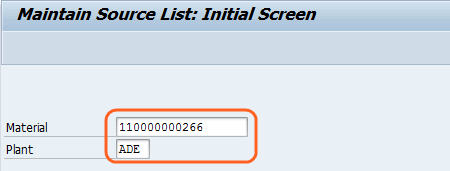
Step 2: – On the “Maintain source list: initial screen”  enter the following details
  • Enter material number that you to maintain the source list.
  • Enter respective plant code.
maintain source list
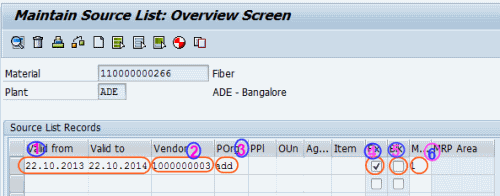
Step 3: - On the”maintain source list: overview screen” enter the following details
  1. Enter the valid period till until which you can procure this material from this vendor.
  2. Enter vendor code in the vendor field..
  3. Enter respective purchasing organization.
  4. Select fixed source field if the vendor is fixed.
  5. Select block source of supply field if the vendor is blocked for procurement for this material.
  6. Enter 1 in to be included in MRP run.
maintain source list oveview screen
 After updating all the mandatory fields, choose save icon to save the entries. Message will be displayed as source list changed.


 http://scn.sap.com/thread/1309540
Source list means list of sources (vendors)available for a particular material to procure.

The purpose of source list is for a material how many source are there to supply.

Steps:
1. while creating MM01 (Material Master) in the purchasing View in other data TICK the SOURCE LIST which makes it mandatory.

While creating Scheduling agreement you have to maintain source list in ME01
The following data are entered.

It contains material, plant,pur org, vendors with validity period from & to so that whether you can procure from the vendor or not.

Following T/Code activities in Material Management module.

Maintain source list  -  ME01
Display source list  -  ME03
Display changes to source list -  ME04
Analyze source list  -  ME06
Reorganize source list  -  ME07
Generate source list  -  ME05
Display source list for material-  ME0M

you make the system settings that are necessary for purchasing operations carried out using source lists.

Source list requirement for materials, It may be necessary to include possible vendors of a material in the source list before the material can be ordered.

The Source list requirement field in the purchasing data of the material master record indicates whether a source list requirement exists for a material.

You can define the Source list requirement at plant level in IMG.  Logistics -->Materials management --> Purchasing --> Source list.

Here you can see the plants for which a source list requirement exists.

user list t-code to kill session

user list t-code : SM04 (to kill session)

2014年2月23日 星期日

GP262 version 0 is not defined for fiscal year 2014

Use transaction OKEQ and select version 0 and double click on fiscal year settings and add fiscal year 2011 here which will solve your problem.